Choose one event and one main action
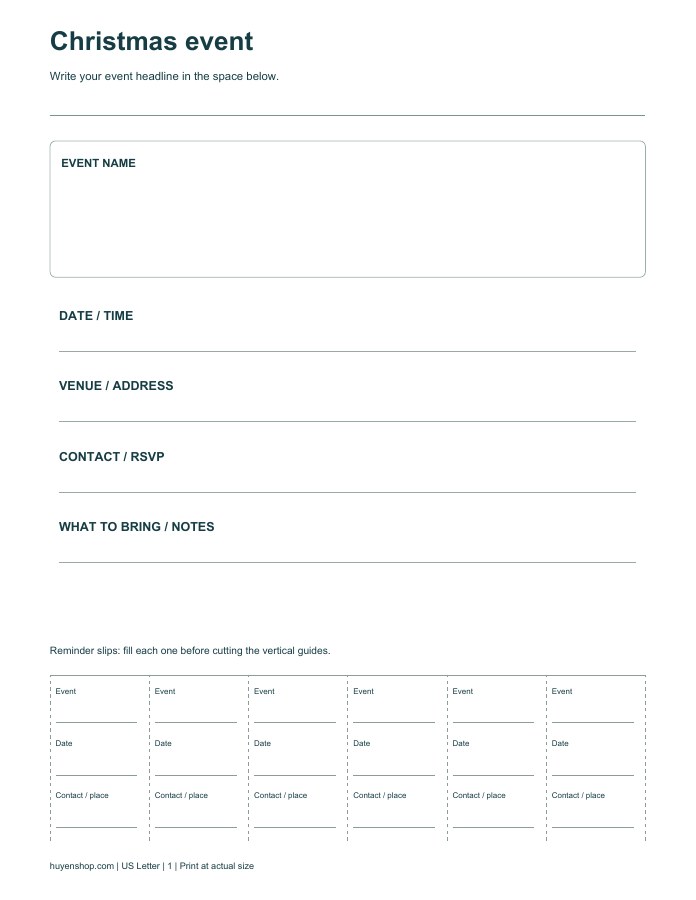
A Christmas flyer template works best when a passing reader can understand its purpose quickly. Use the large headline area for the name of one event, then put the date, time and venue in the central details panel. Decide what you want the reader to do next: attend, reply to the organizer or collect more information. Trying to promote several events makes a small printed flyer harder to scan.
Keep the essential details together
Write a full venue address or a clear location description. Add the organizer's contact information only if it is intended for public display. The extra note area can explain what to bring, whether booking is needed or who the event is for. Keep decoration away from these practical lines. A short handwritten message with good spacing is often easier to read than several crowded paragraphs.
Make the reminder slips useful
The bottom of the sheet has six tear-off reminder slips. Repeat the event name, date and contact or location on each slip before cutting along the vertical guides. Leave the top edge of the strip attached so people can remove one reminder at a time. If the display location does not allow loose slips, leave the bottom intact and use it as a repeated information band.
Check the finished flyer at viewing distance
Print on US Letter paper at actual size and inspect the filled sheet from a few steps away. Confirm that the date and venue remain readable before displaying it. The free download is a handwriting layout. The related poster pack adds editable DOCX event, sale, class and notice templates, PDF planning layouts and a checklist for people who need to prepare a more varied set of notices.